By the end of this guide, you will be able to write a multi-table join from scratch, identify and fix the three most common join failures, and confidently explain why your query returns the exact row count it does. You will do this by following a consistent checklist, then applying a troubleshooting framework when things go wrong.
The reality of working with real databases is that you rarely query a single table. Sales data lives in one place, customer details in another, product information in a third. Combining them into a single result set is the core skill of SQL reporting. This guide walks you through a reliable process for every multi-table join you write, then covers the failure modes that trip up beginners consistently.
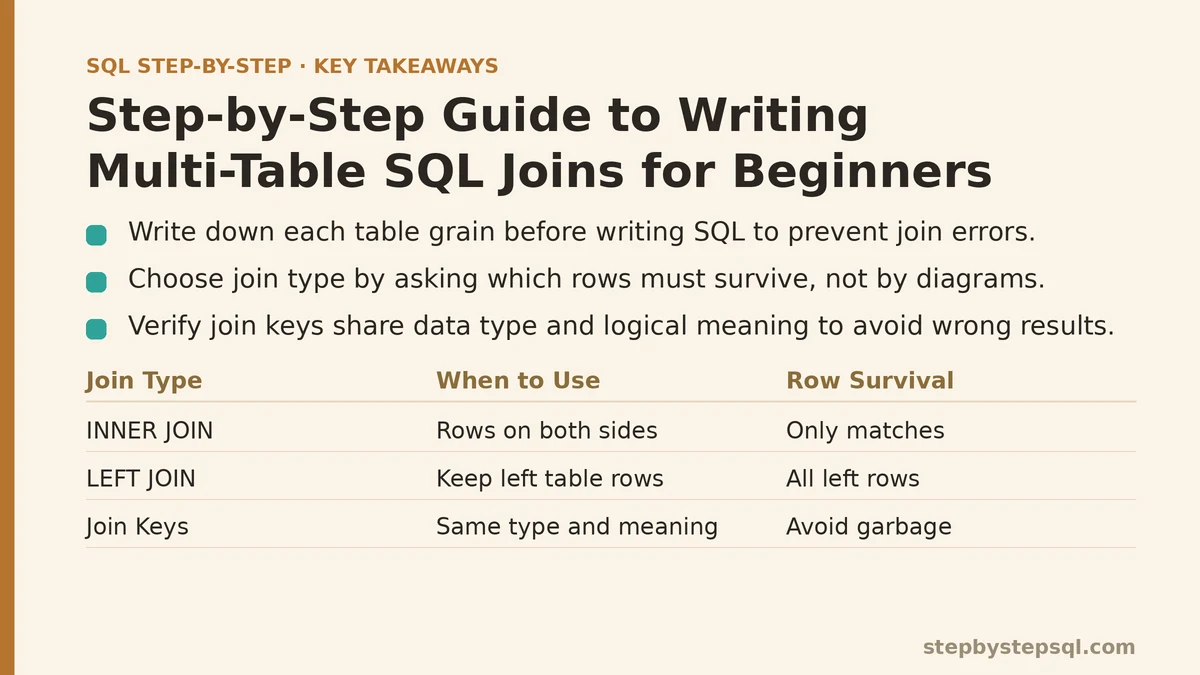
The Four-Step Join Checklist
Before you write a single line of SQL, run through this mental checklist. Skipping any of these steps is the root cause of nearly every join error I see in code reviews.
Identify the grain of each table. A grain is the level of detail at which a table stores its rows. An orders table might have one row per order. An order_items table has one row per line item. A customers table has one row per customer. Write down the grain for each table you plan to use.
Determine the relationship between tables. Ask: does one row in table A match exactly one row in table B, or could it match many? This gives you the cardinality — one-to-one, one-to-many, or many-to-many.
Choose your join type based on what rows must survive. If you need every row from the left table even with no match, use LEFT JOIN. If you only need rows that exist on both sides, use INNER JOIN. Do not pick a join type by memorizing a diagram — pick it by answering this survival question.
Verify the join keys are the right granularity and type. The columns you join on must have the same data type and the same logical meaning. Joining on a customer ID in one table against an order ID in another will produce garbage. Joining on an integer against a string will often produce an error or silently wrong results.
The rest of this guide applies this checklist to a concrete scenario. Then it shows you what happens when each step goes wrong.
A Concrete Setup: Orders, Customers, and Products
For this guide, use three tables you can create in any PostgreSQL or MySQL environment. This is a complete implementation path: create the schema, insert sample data, then run the join.
-- Run this in PostgreSQL or MySQL.
-- setup.sql

CREATE TABLE customers (
    customer_id INT PRIMARY KEY,
    customer_name VARCHAR(100)
);

CREATE TABLE products (
    product_id INT PRIMARY KEY,
    product_name VARCHAR(100),
    price DECIMAL(10, 2)
);

CREATE TABLE orders (
    order_id INT PRIMARY KEY,
    customer_id INT,
    order_date DATE
);

CREATE TABLE order_items (
    order_item_id INT PRIMARY KEY,
    order_id INT,
    product_id INT,
    quantity INT
);

-- Sample data
INSERT INTO customers (customer_id, customer_name) VALUES
(1, 'Alice Chen'),
(2, 'Bob Martinez'),
(3, 'Carol Dubois');

INSERT INTO products (product_id, product_name, price) VALUES
(10, 'Wireless Mouse', 25.99),
(20, 'Mechanical Keyboard', 89.50),
(30, 'USB-C Hub', 45.00);

INSERT INTO orders (order_id, customer_id, order_date) VALUES
(100, 1, '2026-07-01'),
(200, 1, '2026-07-15'),
(300, 2, '2026-07-20');

INSERT INTO order_items (order_item_id, order_id, product_id, quantity) VALUES
(1000, 100, 10, 1),
(1001, 100, 20, 1),
(1002, 200, 30, 2),
(1003, 300, 10, 1),
(1004, 300, 20, 1);
Note that customer 3 (Carol) has zero orders. Product 30 appears in order 200 only. This data is designed to expose the differences between join types and the errors below. If you run this in a database, you can verify every result in this guide directly.
Writing Your First Multi-Table Join
The most common real-world task is combining orders with customer names and product details. This is a three-table join: orders to customers, and orders to products (through order_items).
Here is the query that puts it all together:
SELECT
    o.order_id,
    o.order_date,
    c.customer_name,
    p.product_name,
    oi.quantity,
    p.price * oi.quantity AS line_total
FROM orders o
LEFT JOIN customers c ON o.customer_id = c.customer_id
INNER JOIN order_items oi ON o.order_id = oi.order_id
INNER JOIN products p ON oi.product_id = p.product_id
ORDER BY o.order_id;
Run this query against the setup data. You get four rows, each one a line item with the customer name attached. Alice shows up with her two orders (three line items total), Bob with his one order (two line items). Carol does not appear because she has no orders — the INNER JOIN to order_items strips her out.
This is a complete working example. The verification step: count the rows in order_items. There are four rows. The query returned four rows. That match is your first sanity check — when an INNER JOIN to a detail table is involved, the result row count should equal the number of detail rows that meet the join conditions.
Now let us walk through the three failure modes that break this query or produce misleading results.
Symptom 1: The Row Count Explodes or Shrinks Unexpectedly
Symptom: You run a join between two tables and get far more rows than you expected — or far fewer. You know each table has, say, 100 rows, but the join returns 1,000 rows or 50 rows.
Cause: A mismatch between the join keys and the grain of the tables. The classic case: you join orders to order_items on order_id. One order has multiple items, so the join multiplies each order row by the number of matching items. If you also join customers to orders on customer_id, you get one customer row per order, then one per item — the multiplication stacks. Another cause: you joined on the wrong column entirely, such as joining customers.customer_id to orders.order_id. That can produce partial matches and a row count that looks random.
Fix: Check your join keys against your grain notes from the checklist. For each join, ask: does my join key uniquely identify the row I want to match? If you want one row per order, join orders to customers on customer_id (one-to-one for this data). If you want one row per line item, join orders to order_items on order_id (one-to-many). The result count follows the grain of the table that has the most rows per group.
A quick query to verify your grain before writing the full join:
SELECT order_id, COUNT(*) AS item_count
FROM order_items
GROUP BY order_id
ORDER BY order_id;
This shows you which orders have multiple items. If you see order 100 with 2 rows, you already know an INNER JOIN between orders and order_items will produce two rows for that order.
Symptom 2: NULLs Appear Where You Expected Real Values
Symptom: Your query runs without error, but a column that should have a value shows NULL for some rows.
Cause: The row has no match in the joined table, and you are using a LEFT or RIGHT join. In the example above, a LEFT JOIN from customers to orders would show Carol with NULL in every order column. That is the intended behavior of the join type you chose. However, if you used INNER JOIN and still see NULLs, the cause is different: the data itself contains NULL keys. An order with a customer_id of NULL cannot match any customer record. Another cause: your join condition included an additional filter, such as AND o.order_date > '2026-07-01', which excludes some rows from matching even though they exist.
Fix: First confirm your join type matches the survival question. If you need every row from the left table, LEFT JOIN is correct and NULLs are expected for missing matches. If you see NULLs with an INNER JOIN, check the data. Run a query to find rows with NULL keys:
SELECT order_id, customer_id
FROM orders
WHERE customer_id IS NULL;
If this returns rows, you have orphaned data. You have two options: clean the data (UPDATE orders SET customer_id = … WHERE customer_id IS NULL), or accept that those rows will be excluded and use a LEFT JOIN if you want to see them.
When you put a filter in the ON clause for a LEFT JOIN, move it to the WHERE clause if you mean to filter the final result, not to control the match. For a LEFT JOIN specifically, a filter in the WHERE clause on the right table turns it into an INNER JOIN, because the NULL rows fail the WHERE comparison.
Symptom 3: Rows Are Missing Entirely From the Result
Symptom: You know table A has 10 rows, and you write a join that should show all of them, but only 8 appear.
Cause: You used an INNER JOIN when you needed a LEFT JOIN. The two missing rows are the ones with no matching row in the other table. In typical setup data, if you write FROM customers c INNER JOIN orders o ON c.customer_id = o.customer_id, Carol disappears because she has zero orders. If you then add an INNER JOIN to order_items, you lose any orders that have no line items — which would happen if someone created an order but never added items.
Fix: Decide which table is your “anchor” — the one whose rows must all appear. Put that table first. Use LEFT JOIN for every subsequent table. In our setup, to show all customers including Carol while still attaching her orders and products, write:
SELECT
    c.customer_id,
    c.customer_name,
    o.order_id,
    oi.product_id
FROM customers c
LEFT JOIN orders o ON c.customer_id = o.customer_id
LEFT JOIN order_items oi ON o.order_id = oi.order_id
ORDER BY c.customer_id, o.order_id;
This returns three rows for Carol, one for each order — wait, no. Carol has zero orders, so the LEFT JOIN to orders yields one row with NULL for order_id, and the LEFT JOIN to order_items yields one row with NULL for product_id. The result is a single row for Carol with NULLs. That is correct behavior. If you also want to preserve orders that have no items, the same LEFT JOIN chain preserves them.
The key check: count the distinct anchor table rows in your result. If you anchored on customers and expect 3 customers, your query should contain 3 distinct customer_id values. Run SELECT COUNT(DISTINCT c.customer_id) FROM ... to verify. If you get fewer, a JOIN type is dropping rows.
Choosing Between INNER and LEFT JOIN Under Multi-Table Pressure
When you chain three or more tables, the join type you choose at each step changes the meaning of every subsequent step. A common beginner mistake is to use INNER JOIN for the first two tables, then LEFT JOIN for the third, expecting to preserve all rows from the first table. That does not work — the INNER JOIN already removed unmatched rows from the first table before the LEFT JOIN ever runs.
The rule of thumb: if you need to preserve rows from your anchor table, every join in the chain must be a LEFT JOIN. If you only need fully matched rows, every join can be INNER. Mixing them requires you to track which rows already disappeared at each step. In practice, to preserve the anchor, use LEFT JOIN for every subsequent table until you have a specific reason to switch.
There is a trade-off to using LEFT JOIN exclusively. It can produce NULL-heavy results that complicate downstream calculations. For example, summing quantity where one side is NULL produces NULL, and you need COALESCE(quantity, 0) to get a usable total. If your report only cares about rows with complete data, INNER JOIN is safer and faster — the database can use indexes more effectively when it does not have to generate NULL-padded rows.
When NOT to Use a Multi-Table Join at All
This is the part most tutorials skip. Sometimes the right answer is to avoid the join entirely.
If you are joining two tables only to filter one based on a condition in the other, and you do not need any columns from the second table, use the EXISTS clause instead. It is clearer and avoids the risk of row multiplication. Example: find all customers who have placed an order — using a join would require a DISTINCT or a GROUP BY to avoid duplicate customers. Using EXISTS, no duplicates are possible:
SELECT customer_id, customer_name
FROM customers c
WHERE EXISTS (
    SELECT 1
    FROM orders o
    WHERE o.customer_id = c.customer_id
);
This pattern is faster when the joined table has many rows per match, because the database stops scanning after the first match. It also removes the need to deduplicate your result.
Another case: if you need a single aggregate value from a related table, such as each customer’s total spend, a correlated subquery in the SELECT list beats a join plus GROUP BY for readability and often for performance on small result sets. That said, for large tables, a proper JOIN with GROUP BY is typically better because it can be optimized with the right indexes.
A Troubleshooting Decision Tree
When your join returns the wrong result, work through this order rather than guessing.
- Is the row count wrong? Check the grain of each table. Confirm you are not joining on a unique column where you intended a one-to-many relationship.
- Are NULLs appearing where they should not? Run a query to find NULL keys in your join columns.
- Are rows missing? Verify you anchored on the correct table and used LEFT JOIN for every table that must not drop rows.
- Is the query slow? Examine the execution plan. Without indexes on your join keys, even small tables can slow down at scale. Add an index on the foreign key columns used in the ON clauses.
A practical verification script for any join:
-- Verify join counts
SELECT
    (SELECT COUNT(*) FROM orders) AS total_orders,
    (SELECT COUNT(DISTINCT order_id) FROM order_items) AS orders_with_items,
    (SELECT COUNT(*) FROM customers) AS total_customers;
Compare these numbers to your join result. If total_orders is 3 and orders_with_items is also 3, an INNER JOIN between them should return exactly 3 distinct order IDs. If it returns more, the join key is not unique on one side.
The Checklist Applied to a Realistic Report
You are asked to produce a report with the following columns: order ID, order date, customer name, and the total quantity of products within that order. You notice some orders have zero items, and every customer must appear even if they have no orders.
Applying the checklist: the anchor table is customers (every customer must appear). The grain of customers is one row per customer. Orders can have zero or many items, so the relationship between customers and orders is one-to-many. Between orders and order_items, it is also one-to-many (some orders have zero items). You need a total quantity per order, which requires GROUP BY at the order level.
The query:
SELECT
    c.customer_name,
    o.order_id,
    o.order_date,
    COALESCE(SUM(oi.quantity), 0) AS total_quantity
FROM customers c
LEFT JOIN orders o ON c.customer_id = o.customer_id
LEFT JOIN order_items oi ON o.order_id = oi.order_id
GROUP BY c.customer_id, c.customer_name, o.order_id, o.order_date
ORDER BY c.customer_name, o.order_id;
Notice the GROUP BY includes c.customer_id even though it is not in the SELECT. This satisfies most databases’ strict GROUP BY rules and protects against two customers with the same name. The COALESCE converts NULL totals — for Carol or for orders with no items — into zero.
This query is the full path from setup to a verified result. You can check that Carol appears once with a NULL order row and a total_quantity of zero. You can verify that order 100 shows a total_quantity of 2 (one mouse plus one keyboard). The row count equals the number of distinct (customer, order) pairs, which is 4 — three orders plus Carol’s placeholder row.
The investment this skill requires is small, but the payoff in reporting accuracy is immediate. The checklist is short enough to run mentally before every join you write, and the troubleshooting tree covers the majority of beginner failures. The difference between a working join and a broken one is rarely a syntax problem. It is a conceptual problem about grains, relationships, and survival rules. Now that you can name those concepts explicitly, you can fix the problems when you see them.
If you have a specific multi-table reporting question, describe the tables you are joining, their grain, and which rows must survive — and I will sketch the exact join chain for you.
Related guides: Beginners Guide to SQL Window Functions: ROW_NUMBER and RANK Explained, Common SQL JOIN Mistakes That Duplicate or Drop Rows, and Difference Between INNER JOIN and LEFT JOIN: The Confusion Finally Resolved.