By the end of this tutorial you will be able to write a single SQL query that produces a transaction-level ledger with a running balance column, a monthly rollup of net cash flow, and a month-over-month growth percentage — all from one flat transactions table. You will also know the two places this kind of query typically produces wrong numbers, and how to verify the result before anyone builds a chart from it.
Financial reporting has a specific shape that most SQL tutorials ignore. Analysts do not just need totals; they need a number that accumulates across ordered rows, and a comparison against the prior period. Both of those are window function problems, and both have subtle failure modes that surface only when the data contains gaps, refunds, or an incomplete first month.
The Starting Table
Assume a single table, transactions, with one row per posted entry. A realistic shape looks like this:
CREATE TABLE transactions (
    txn_id       INTEGER PRIMARY KEY,
    account_id   INTEGER      NOT NULL,
    posted_date  DATE         NOT NULL,
    amount       NUMERIC(12,2) NOT NULL,
    memo         TEXT
);
Two conventions matter before writing any query. First, amount is signed: deposits are positive, withdrawals and fees are negative. Storing both directions in one signed column is what makes SUM() produce a net balance without any CASE expression. Second, posted_date is a DATE, not a timestamp. If your source system stores timestamps, cast to a date early so that multiple transactions on the same calendar day do not get ordered arbitrarily.
Step 1: A Running Balance with a Window Frame
The running balance is a cumulative sum, ordered by date, partitioned by account. In standard SQL:
SELECT
    txn_id,
    account_id,
    posted_date,
    amount,
    SUM(amount) OVER (
        PARTITION BY account_id
        ORDER BY posted_date, txn_id
        ROWS BETWEEN UNBOUNDED PRECEDING AND CURRENT ROW
    ) AS running_balance
FROM transactions
ORDER BY account_id, posted_date, txn_id;
Three details in that window specification are doing real work.
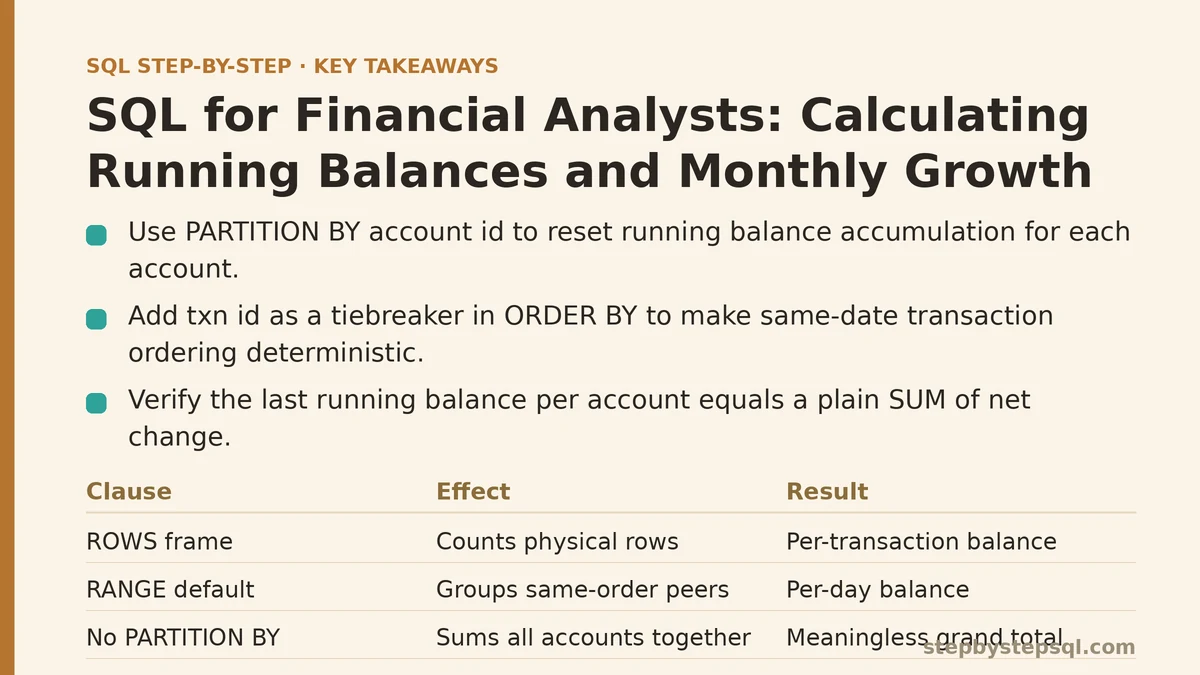
PARTITION BY account_id resets the accumulation for each account. Without it, every account’s transactions would sum into one meaningless grand total.
ORDER BY posted_date, txn_id defines the accumulation order. The second sort key is not decorative. If two transactions post on the same date, posted_date alone leaves the order undefined, and the database is free to place them in either sequence. The running balance at each row would then flip between runs. Adding txn_id as a tiebreaker makes the result deterministic.
ROWS BETWEEN UNBOUNDED PRECEDING AND CURRENT ROW defines the window frame explicitly. This is the part most tutorials skip, and it is the part that changes answers. With ORDER BY present and no frame clause, SQL defaults to RANGE BETWEEN UNBOUNDED PRECEDING AND CURRENT ROW, which treats all rows sharing the same ORDER BY value as peers and includes them together. That means same-date transactions would each show the same balance — the total after all of that day’s entries — rather than a per-row progression. ROWS (physical rows) versus RANGE (logical peers) is the distinction that decides whether you get a per-transaction ledger balance or a per-day balance.
Verify Before Continuing
Before adding anything else, check the running balance against a known figure. The final row for each account should equal a plain sum:
SELECT account_id, SUM(amount) AS net_change
FROM transactions
GROUP BY account_id;
The last running_balance value for each account, ordered the same way, must match net_change exactly. If it does not, the frame clause or the PARTITION BY is wrong, and every downstream calculation inherits the error. This check takes seconds and catches the majority of mistakes in this kind of query.
Step 2: Monthly Net Flow
Running balances live at the transaction grain. Financial reporting usually needs the monthly grain too, so collapse the detail into months first, then aggregate:
WITH monthly AS (
    SELECT
        account_id,
        DATE_TRUNC('month', posted_date) AS month_start,
        SUM(amount) AS net_flow
    FROM transactions
    GROUP BY account_id, DATE_TRUNC('month', posted_date)
)
SELECT
    account_id,
    month_start,
    net_flow,
    SUM(net_flow) OVER (
        PARTITION BY account_id
        ORDER BY month_start
        ROWS BETWEEN UNBOUNDED PRECEDING AND CURRENT ROW
    ) AS closing_balance
FROM monthly
ORDER BY account_id, month_start;
Note the two-stage structure. The CTE handles grouping, and the window function runs over the already-collapsed monthly rows. Nesting a SUM() window inside a GROUP BY query in one pass is a common source of errors; separating the steps keeps the logic legible and the results easier to reason about.
DATE_TRUNC is the standard function in PostgreSQL, Snowflake, Redshift, and DuckDB. MySQL uses DATE_FORMAT(posted_date, '%Y-%m-01'), and older SQL Server setups often use DATEFROMPARTS(YEAR(posted_date), MONTH(posted_date), 1). The semantics are identical; only the function name changes.
Step 3: Month-over-Month Growth with LAG
Growth compares a month to its predecessor. LAG retrieves the prior row’s value within the partition and order:
WITH monthly AS (
    SELECT
        account_id,
        DATE_TRUNC('month', posted_date) AS month_start,
        SUM(amount) AS net_flow
    FROM transactions
    GROUP BY account_id, DATE_TRUNC('month', posted_date)
),
with_lag AS (
    SELECT
        account_id,
        month_start,
        net_flow,
        LAG(net_flow) OVER (
            PARTITION BY account_id
            ORDER BY month_start
        ) AS prior_net_flow
    FROM monthly
)
SELECT
    account_id,
    month_start,
    net_flow,
    prior_net_flow,
    (net_flow - prior_net_flow) AS mom_change,
    ROUND(
        100.0 * (net_flow - prior_net_flow) / NULLIF(prior_net_flow, 0),
        2
    ) AS mom_growth_pct
FROM with_lag
ORDER BY account_id, month_start;
The NULLIF(prior_net_flow, 0) wrapper is not optional in production. If a prior month had zero net flow — a month with no activity, or deposits exactly offset by withdrawals — dividing by zero raises an error in most engines and returns NULL in some others. NULLIF converts that zero into NULL before the division, which yields a NULL growth figure instead of a crash. A NULL growth percentage is the honest answer when the base is zero; inventing a number there would misrepresent the data.
Where the First Month Goes Wrong
LAG returns NULL for the first row in each partition, because there is no prior month. That is correct behavior, but the downstream result is a NULL growth percentage on the first month of every account’s history. Two things commonly go wrong here:
- Silent
NULLpropagation. Averages, chart lines, and conditional formatting that do not handleNULLwill either drop the first month or render a gap. Decide explicitly whether the first month should show a dash, be excluded, or be treated as0%. There is no default that fits every report. - Gaps inside the series.
LAGwalks over the rows that exist, not over the calendar. If March has no transactions at all, the query returns February, then April, andLAGtreats February as “the prior month” for April. The growth figure then compares April to February while labeling it month-over-month. The number is arithmetically correct against the wrong baseline.
Handling the Missing-Month Problem
The fix is to generate a complete month spine per account and left join the actual flows onto it, so every calendar month appears as a row — including months with zero activity.
WITH months AS (
    SELECT DISTINCT DATE_TRUNC('month', posted_date) AS month_start
    FROM transactions
),
accounts AS (
    SELECT DISTINCT account_id FROM transactions
),
spine AS (
    SELECT a.account_id, m.month_start
    FROM accounts a
    CROSS JOIN months m
),
flows AS (
    SELECT
        account_id,
        DATE_TRUNC('month', posted_date) AS month_start,
        SUM(amount) AS net_flow
    FROM transactions
    GROUP BY account_id, DATE_TRUNC('month', posted_date)
)
SELECT
    s.account_id,
    s.month_start,
    COALESCE(f.net_flow, 0) AS net_flow
FROM spine s
LEFT JOIN flows f
    ON s.account_id = f.account_id
   AND s.month_start = f.month_start
ORDER BY s.account_id, s.month_start;
This CROSS JOIN spine approach trades a little verbosity for a series where each row is exactly one calendar month apart from its neighbor. A prior-month LAG now compares to the correct baseline even in months with no activity, because gap months exist as explicit zero rows. The cost is that the query scans the transaction table twice more and materializes the full account-by-month grid, which can be noticeably larger than the transaction set itself for accounts with sparse history.
This is also the point to note a trade-off. If the report is a rolling balance for a single account with dense monthly activity, the spine is unnecessary overhead. If the report feeds a chart that must show flat months as zero rather than skipping them, the spine is the only correct approach. There is no universally right answer here; the choice depends on what the report is meant to communicate.
Tools Beyond SQL, and When Not to Reach for This
The queries above work in PostgreSQL, Snowflake, BigQuery, Redshift, and SQL Server with the function-name adjustments already noted. Two places where they stop being the right tool:
- Adjusting for a starting balance. A running balance computed from transactions shows the change since the first row in the table, not the account’s true balance including any opening figure. If the ledger starts mid-history, add the opening balance as a constant:
opening_balance + SUM(amount) OVER (...). Do not assume the first transaction represents a zero starting point. - Continuous or intraday reporting. Financial reporting with intraday requirements is usually handled by a dedicated ledger or reporting engine, not by window functions over raw transaction tables. Window functions recompute the entire history on every query; at high volume, the scan cost dominates and pre-aggregated tables or incremental materialized views are the standard answer.
| Requirement | Running balance with window functions | Pre-aggregated monthly table |
|---|---|---|
| Ad-hoc exploration of a single account | Good fit — one query, no maintenance | Overkill |
| Multi-year history across thousands of accounts | Scan cost grows with history; consider materializing | Preferred, refreshed on a schedule |
| Intraday balance | Not the right tool; query cost is prohibitive | Needed for real-time reporting |
| Report must show zero months explicitly | Requires a CROSS JOIN month spine | Naturally stored as zero rows |
A Final Checklist Before You Trust the Output
Work through these in order; each one catches a class of error the previous step cannot.
- Does the last
running_balanceper account equal a plainSUM(amount)for that account? - Is every same-date tie broken by a second
ORDER BYkey such astxn_id? - Has the window frame been declared as
ROWSexplicitly, or is the defaultRANGEbehavior acceptable for the report? - Does every
LAG-based growth figure divide withNULLIFto avoid the zero-base error? - If the report plots monthly points, is there a month spine so gap months appear as zero rather than being skipped?
If you would like, describe the shape of your transactions table — the columns, whether amount is signed, and whether history starts at account opening or mid-stream — and the running balance and growth logic can be adapted to that specific schema.