Say you are trying to build a monthly sales report and you need every order from the last three calendar months, grouped by month, with the month displayed as 2026-01 rather than a full timestamp. You write something that looks reasonable, run it, and get numbers that are close to what a dashboard shows but not identical. Now you are debugging whether the problem is your filter, your grouping, or the way the database is storing the dates in the first place.
Date handling is where a lot of SQL queries go wrong quietly. Nothing errors out; the results are just slightly off. This tutorial walks through the date functions you will reach for most often, using a myth-versus-reality framing so the common assumptions get corrected up front.
Myth 1: “A Date Column Holds a Date”
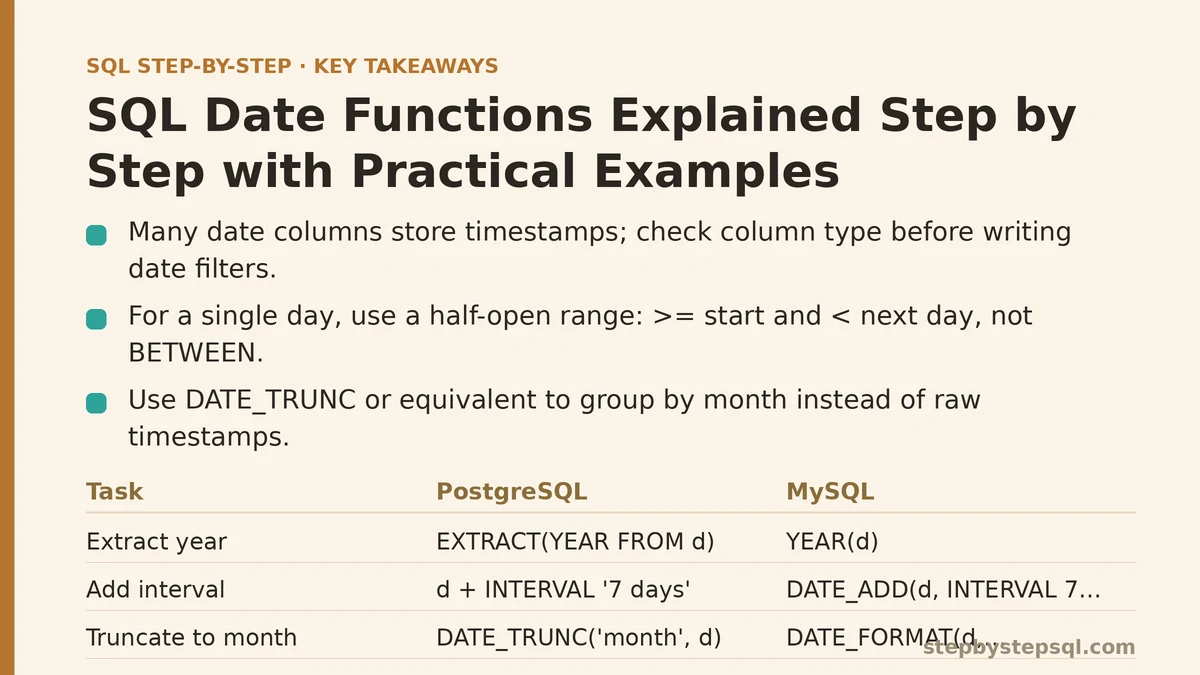
Reality: many columns called order_date or created_at are timestamps, storing a date and a time down to the second or microsecond. That distinction changes how every comparison behaves.
If created_at holds 2026-03-31 23:45:10, then a filter like WHERE created_at = '2026-03-31' compares a timestamp against a date literal, which the database interprets as midnight at the start of that day: 2026-03-31 00:00:00. The 23:45 order does not match, and it silently drops from your result.
The safe pattern for a single day is a half-open range:
-- Returns every row from March 31, including times after midnight
SELECT order_id, created_at
FROM orders
WHERE created_at >= '2026-03-31'
  AND created_at <  '2026-04-01';
Using >= on the start and < on the next day captures the whole day without needing to know the timestamp’s precision. Avoid BETWEEN '2026-03-31' AND '2026-03-31' for this reason: it collapses to a single point in time, not a day.
Before writing date filters, confirm what the column is. In PostgreSQL, \d+ orders shows the column type; in MySQL, SHOW COLUMNS FROM orders; does the same. If the type reads timestamp, timestamptz, or datetime, treat it as a point in time, not a calendar date.
Myth 2: “Extracting a Year or Month Is a Minor Detail”
Reality: extraction is the foundation of nearly every date-based report, and getting it right is what lets you group by period instead of by raw value.
The functions below pull a single component out of a date or timestamp. Names differ across engines, so check the table before committing to one.
| Task | PostgreSQL | MySQL | SQL Server | SQLite |
|---|---|---|---|---|
| Extract year | EXTRACT(YEAR FROM d) | YEAR(d) | YEAR(d) | strftime('%Y', d) |
| Extract month | EXTRACT(MONTH FROM d) | MONTH(d) | MONTH(d) | strftime('%m', d) |
| Extract day of month | EXTRACT(DAY FROM d) | DAY(d) | DAY(d) | strftime('%d', d) |
| Day of week | EXTRACT(DOW FROM d) | DAYOFWEEK(d) | DATEPART(WEEKDAY, d) | strftime('%w', d) |
| Current timestamp | NOW() | NOW() | GETDATE() | datetime('now') |
| Add an interval | d + INTERVAL '7 days' | DATE_ADD(d, INTERVAL 7 DAY) | DATEADD(day, 7, d) | date(d, '+7 days') |
| Truncate to month | DATE_TRUNC('month', d) | DATE_FORMAT(d, '%Y-%m-01') | DATEFROMPARTS(YEAR(d), MONTH(d), 1) | date(d, 'start of month') |
A grouping query that produces a YYYY-MM label from a timestamp looks like this in PostgreSQL:
SELECT
  TO_CHAR(DATE_TRUNC('month', created_at), 'YYYY-MM') AS order_month,
  COUNT(*)      AS order_count,
  SUM(total)    AS revenue
FROM orders
WHERE created_at >= DATE_TRUNC('month', CURRENT_DATE) - INTERVAL '3 months'
  AND created_at <  DATE_TRUNC('month', CURRENT_DATE) + INTERVAL '1 month'
GROUP BY DATE_TRUNC('month', created_at)
ORDER BY DATE_TRUNC('month', created_at);
Two things are doing the work here. DATE_TRUNC('month', ...) snaps every timestamp to the first of its month, which becomes a clean grouping key. The WHERE clause compares timestamps to timestamps, so there is no implicit cast stripping the time component.
Walk through it: the setup is the orders table with a created_at timestamp and a total numeric column. The change is adding the truncation to both the SELECT and the GROUP BY. To verify, run the query without the outer aggregation and eyeball a few rows to confirm the month label matches the raw timestamp’s month.
Myth 3: “You Can’t Do Date Arithmetic Without a Helper Library”
Reality: every mainstream SQL engine supports adding and subtracting intervals directly, though the syntax varies enough that copy-pasting across engines is a common source of bugs.
The mental model is consistent: pick a unit (day, week, month, year), give it a number, and combine it with your date. The three dialects below all produce the same result, a date 30 days in the future:
-- PostgreSQL
SELECT CURRENT_DATE + INTERVAL '30 days' AS due_date;

-- MySQL
SELECT DATE_ADD(CURRENT_DATE, INTERVAL 30 DAY) AS due_date;

-- SQL Server
SELECT DATEADD(day, 30, GETDATE()) AS due_date;
One subtlety worth knowing: interval arithmetic on months is not the same as multiplying days. Adding one month to 2026-01-31 typically yields the last day of February, not March 3, because engines clamp to the end of the shorter month. If your business logic depends on exact day counts, use day intervals instead of month intervals and test around month boundaries.
When NOT to use interval math
If you need “the same weekday next month” or “the first business day of the following quarter,” plain interval arithmetic will not get you there reliably. Those questions usually need a calendar table: a physical table with one row per date and columns for the month, quarter, weekday, and holiday flag. Joining to a calendar table is often simpler and more auditable than encoding that logic in expressions.
Myth 4: “Current Date Functions Are Trivially Portable”
Reality: CURRENT_DATE, NOW(), and their cousins look interchangeable in tutorials but behave differently on two axes: time zone and transaction behavior.
CURRENT_DATEreturns the session’s current date with no time component. It is a date, so comparisons to date columns behave sensibly.NOW()in PostgreSQL and MySQL returns a timestamp with the time of the current transaction (the whole transaction sees oneNOW()value, even if it runs for several seconds).GETDATE()in SQL Server returns the current date and time with datetime precision.CURRENT_TIMESTAMPis the SQL standard name and is the safest guess if you need something portable.
The time zone question matters for reporting. If your database stores timestamps in UTC but your business reports in a local time zone, then CURRENT_DATE evaluated in UTC will be off by a day for part of every evening. The fix is to convert explicitly before extracting a date:
-- Convert to a business time zone before deriving the date
SELECT
  (created_at AT TIME ZONE 'America/New_York')::date AS local_order_date,
  COUNT(*) AS orders
FROM orders
WHERE created_at >= CURRENT_DATE - INTERVAL '7 days'
GROUP BY local_order_date
ORDER BY local_order_date;
This is PostgreSQL syntax; MySQL has CONVERT_TZ(created_at, 'UTC', 'America/New_York') and SQL Server has AT TIME ZONE 'Eastern Standard Time'. In every case, the point is to convert before you extract, because the time zone conversion changes which calendar day a late-evening timestamp falls on.
A failure mode to watch for: applying AT TIME ZONE to a column that is already stored in local time. That double-converts and shifts your results by hours in the wrong direction. Check what the column stores (UTC or local) before adding a conversion step.
Myth 5: “Truncation and Formatting Are the Same Job”
Reality: truncation changes a timestamp into a coarser timestamp (used for grouping), while formatting changes a date into a string (used for display). Mixing them up causes subtle bugs.
DATE_TRUNC('month', created_at) returns a timestamp at midnight on the first of the month. You can sort on it, compare it, and use it as a join key, and it sorts chronologically. TO_CHAR(created_at, 'YYYY-MM') returns text. That text sorts alphabetically, which happens to match chronological order for YYYY-MM but breaks the moment you use MON or Month names instead of numbers.
Choose based on what you need:
- Grouping, sorting, or comparisons: keep the value as a date or timestamp and use
DATE_TRUNC(or the engine’s equivalent). - Displaying in the final
SELECTlist: format to a string withTO_CHAR(Postgres),DATE_FORMAT(MySQL), orFORMAT(SQL Server).
The trap is grouping by a formatted string inside a subquery and then trying to range-filter on it. String comparisons against dates do not use indexes efficiently, and the query becomes a full scan as the table grows. Keep grouping values in their native type until the last step of the query.
A Practical End-to-End Example: Retention by Signup Cohort
This example combines filtering, extraction, truncation, and date arithmetic into one query you can adapt.
Setup: a users table with user_id and signup_at (timestamp), and a sessions table with user_id and session_date (date).
Goal: for each signup month, report what share of users returned in the two weeks following signup.
WITH cohort AS (
  SELECT
    user_id,
    DATE_TRUNC('month', signup_at)::date AS signup_month,
    signup_at::date                      AS signup_date
  FROM users
  WHERE signup_at >= DATE '2025-01-01'
    AND signup_at <  DATE '2026-01-01'
),
returners AS (
  SELECT DISTINCT c.user_id, c.signup_month
  FROM cohort c
  JOIN sessions s
    ON s.user_id = c.user_id
   AND s.session_date >= c.signup_date + 7
   AND s.session_date <  c.signup_date + 14
)
SELECT
  c.signup_month,
  COUNT(DISTINCT c.user_id)                     AS cohort_size,
  COUNT(DISTINCT r.user_id)                     AS returned_users,
  ROUND(100.0 * COUNT(DISTINCT r.user_id)
        / COUNT(DISTINCT c.user_id), 1) AS return_pct
FROM cohort c
LEFT JOIN returners r
  ON r.user_id = c.user_id
 AND r.signup_month = c.signup_month
GROUP BY c.signup_month
ORDER BY c.signup_month;
Walk through the change: the cohort CTE snaps each signup to its month and keeps the raw signup date for the two-week window. The returners CTE joins sessions where the session date falls in the half-open range [signup + 7 days, signup + 14 days), which correctly captures the seventh through thirteenth days without boundary off-by-one errors. The outer query counts and computes the percentage.
Verify the result: run the cohort CTE alone and confirm every user_id appears once. Then run the returners CTE alone for one specific signup month and spot-check a handful of users against their sessions manually. If the counts look off, check the boundary conditions first: >= signup + 7 and < signup + 14 is easy to accidentally flip, and a single wrong operator shifts everyone by a day.
Myth 6: “Date Filters Are Just BETWEEN”
Reality: BETWEEN is inclusive on both ends, which is correct for date-only columns but dangerous for timestamps and for ranges that straddle a boundary.
Use BETWEEN when both endpoints are dates and you want both included. Use a half-open comparison (>= start AND < end) when either endpoint is a timestamp, or when the range is expressed as “up to but not including” a period boundary. The half-open pattern also composes better when you build a range by adding intervals: start + INTERVAL '1 month' becomes the exclusive end without any mental arithmetic about the last second of the month.
Quick Reference: Which Function for Which Job
| You want to… | Use | Watch out for |
|---|---|---|
| Get today’s date | CURRENT_DATE | Respects the session time zone; may differ from UTC |
| Get now as a timestamp | CURRENT_TIMESTAMP | Fixed for the whole transaction in some engines |
| Pull out a year, month, day | EXTRACT / YEAR / MONTH | Returns a number, not a date |
| Snap to the start of a period | DATE_TRUNC (Postgres), DATE_FORMAT (MySQL) | Returns a timestamp; formatting returns text |
| Add days, weeks, months | INTERVAL / DATE_ADD / DATEADD | Month math clamps to the month’s last day |
| Build a display label | TO_CHAR / DATE_FORMAT / FORMAT | Text sorts lexically, not chronologically |
| Filter a single day on a timestamp column | Half-open range: >= start AND < next_day | BETWEEN on both ends misses late-day rows |
| Handle business time zones | AT TIME ZONE / CONVERT_TZ | Do not double-convert local columns |
What to Take Away
The date functions themselves are simple; the difficulty lives in the assumptions around them. The three habits that prevent most date bugs are: know whether your column is a date or a timestamp, filter with half-open ranges so boundary rows do not get dropped, and keep values in their native date type until the final display step. Those three corrections cover the majority of issues that show up when date-based reports disagree with the rest of your stack.
Do you have a date range filter that is returning rows close to what you expect but not exact? Describe the column type and the filter you are using, and the mismatch usually becomes obvious once the boundaries are spelled out.