A common misconception about SQL date filtering is that you can compare a timestamp column directly against a date string and get the results you expect. You usually can’t, or at least not reliably. Writing WHERE order_date = '2026-03-01' looks like it should return every order placed on March 1st, but if order_date stores a time component — which most timestamp columns do — that condition silently returns nothing, because no stored value equals exactly midnight unless an order happened to be placed at 00:00:00. Correct date filtering almost always requires either a function that strips the time portion, or a range comparison that handles it explicitly.
This tutorial covers both approaches, then moves into the grouping side of the same problem: rolling daily rows up into months, comparing year-over-year totals, and building the kind of time-series output that business reporting depends on.
Part 1: Beginner Patterns
The Shape of a Date Filter
Every date filter you write is doing one of two things: comparing two points in time, or extracting a component (day, month, year, weekday) from a stored value. The first category is about ranges. The second is about labels.
If you remember only that distinction, most date SQL becomes predictable. A filter like “orders from last month” is a range. A grouping like “sales per month” is a label extraction plus an aggregate.
Filtering by an Exact Day
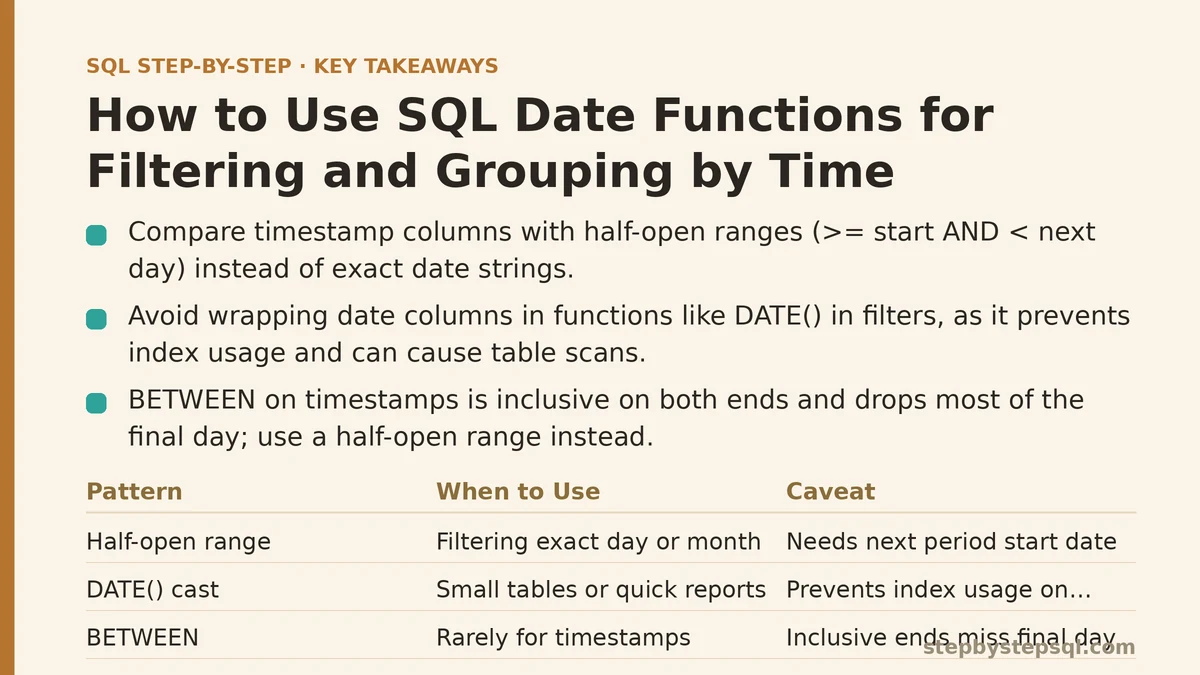
The reliable way to filter for one calendar day is a half-open range: greater than or equal to the start, less than the start of the next day.
SELECT order_id, customer_id, order_date, total
FROM orders
WHERE order_date >= '2026-03-01'
  AND order_date <  '2026-03-02';
This works regardless of whether order_date is a DATE or a TIMESTAMP, and it works whether or not the column has an index (it does, and the query can use it). The comparison form >= start AND < next_day_start is the standard pattern for time-range filtering in SQL and appears throughout production reporting code.
Why DATE(order_date) = '2026-03-01' Is Usually a Mistake
The tempting alternative is to wrap the column in a function and compare the extracted date:
-- works, but usually the wrong choice
SELECT order_id
FROM orders
WHERE DATE(order_date) = '2026-03-01';
This returns the right rows on a small table. On a large one it becomes a problem, because wrapping the column in a function prevents the database from using an index on that column. The engine has to evaluate DATE(order_date) for every row before it can filter. Once you’re past a few hundred thousand rows, the difference between the two queries grows from “slightly slower” to “measure this in seconds instead of milliseconds”. The range filter above is not a stylistic preference — it is the difference between using an index and scanning the table.
Filtering with BETWEEN and Its Edge Case
BETWEEN is inclusive on both ends, which makes it a poor fit for timestamp columns:
-- silently excludes everything on 2026-03-31 after midnight
WHERE order_date BETWEEN '2026-03-01' AND '2026-03-31'
This looks like “all of March” but only returns rows up to 2026-03-31 00:00:00. The correct rewrite is either the half-open range (>= '2026-03-01' AND < '2026-04-01') or an explicit DATE() cast on both sides of a short report where performance doesn’t matter. Prefer the half-open range by default.
Extracting Components for Display
Once you’re past filtering, the next job is labelling. The EXTRACT function (supported in PostgreSQL, MySQL 8+, and most modern engines) pulls a numeric component out of a date:
SELECT
    EXTRACT(YEAR  FROM order_date) AS order_year,
    EXTRACT(MONTH FROM order_date) AS order_month,
    COUNT(*) AS order_count
FROM orders
GROUP BY order_year, order_month
ORDER BY order_year, order_month;
Each row now represents one calendar month, with a count of orders placed in it. This is the fundamental building block of monthly reporting, and it’s the topic the advanced half of this post expands on.
Part 2: Advanced Patterns
Truncating Instead of Extracting
Extracting year and month separately works, but it forces you to carry two columns through every downstream query. A cleaner approach is to truncate the timestamp down to the start of the period you care about, keeping a single ordered, sortable value:
-- PostgreSQL
SELECT
    DATE_TRUNC('month', order_date) AS month_start,
    SUM(total) AS revenue
FROM orders
GROUP BY month_start
ORDER BY month_start;
The equivalent in MySQL is different enough to matter: MySQL has no DATE_TRUNC, and uses DATE_FORMAT for the string route or a DATE_ADD/DATE_SUB construction for a true date result.
-- MySQL
SELECT
    DATE_FORMAT(order_date, '%Y-%m-01') AS month_start,
    SUM(total) AS revenue
FROM orders
GROUP BY month_start
ORDER BY month_start;
DATE_FORMAT returns a string, which sorts correctly with a %Y-%m-%d pattern but loses date arithmetic support downstream. If you need the result to remain a date, use LAST_DAY arithmetic to bounce back to the first of the month:
-- MySQL, returns a DATE
SELECT
    DATE_SUB(DATE_ADD(LAST_DAY(order_date), INTERVAL 1 DAY), INTERVAL 1 MONTH) AS month_start,
    SUM(total) AS revenue
FROM orders
GROUP BY month_start
ORDER BY month_start;
Both work. The string version is easier to read; the date version avoids casting surprises when you later add intervals or join against a calendar table.
Grouping by Weekday, Quarter, or Hour
The same truncation idea extends to other periods:
-- PostgreSQL: revenue by weekday name
SELECT
    TO_CHAR(order_date, 'Day') AS weekday,
    SUM(total) AS revenue
FROM orders
GROUP BY weekday
ORDER BY revenue DESC;
A subtle failure mode lives here: TO_CHAR(order_date, 'Day') returns a padded string ('Monday ' with trailing spaces) in PostgreSQL, so GROUP BY weekday still groups correctly, but display output looks misaligned. Trimming with TRIM() fixes the display without changing the grouping.
For hour-of-day breakdowns, EXTRACT(HOUR FROM created_at) works in both PostgreSQL and MySQL 8+ and returns an integer from 0 to 23.
A Worked Implementation: Month-over-Month Revenue
Here is a concrete path from setup to verified output. The goal is a table showing each month’s revenue alongside the previous month’s revenue and the percentage change between them.
Step 1 — Establish the base monthly aggregate.
WITH monthly AS (
    SELECT
        DATE_TRUNC('month', order_date) AS month_start,
        SUM(total) AS revenue
    FROM orders
    GROUP BY month_start
)
SELECT * FROM monthly ORDER BY month_start;
Step 2 — Attach the previous month’s value with LAG.
WITH monthly AS (
    SELECT
        DATE_TRUNC('month', order_date) AS month_start,
        SUM(total) AS revenue
    FROM orders
    GROUP BY month_start
)
SELECT
    month_start,
    revenue,
    LAG(revenue) OVER (ORDER BY month_start) AS prev_month_revenue,
    ROUND(
        100.0 * (revenue - LAG(revenue) OVER (ORDER BY month_start))
        / NULLIF(LAG(revenue) OVER (ORDER BY month_start), 0),
        2
    ) AS pct_change
FROM monthly
ORDER BY month_start;
Two details worth flagging. The NULLIF(..., 0) guards against division by zero when a prior month has no revenue. The first row of the output will show NULL for prev_month_revenue because there is no earlier month to reference — that’s expected, not a bug.
Step 3 — Verify the result.
Run the monthly aggregate first and eyeball three or four months against a known total. If January’s revenue in the report matches January’s total in a WHERE order_date >= '2026-01-01' AND order_date < '2026-02-01' check, the truncation and grouping are behaving correctly. Do this once per new report; date boundaries are where silent off-by-one-month errors hide.
Time Zones: The Failure Mode That Doesn’t Show Up in Small Tests
Everything above assumes order_date is stored in one consistent time zone. If orders arrive from multiple regions and the column is stored as TIMESTAMPTZ (PostgreSQL) or TIMESTAMP WITH TIME ZONE (Oracle/MySQL variants), the underlying value is normalized to UTC and the extraction functions operate on that UTC value. That means a late-evening order in Tokyo can land in the previous day’s bucket, and a report grouped by local day will disagree with the operators who generated the data.
The fix depends on your engine. PostgreSQL supports order_date AT TIME ZONE 'Asia/Tokyo' before the extraction; MySQL relies on CONVERT_TZ(order_date, '+00:00', '+09:00'). Either way, the time-zone conversion has to happen before the DATE_TRUNC or DATE_FORMAT, not after, or the grouping is already wrong. This is a failure mode that stays invisible on small test datasets where all rows come from one region.
When Not to Group by Date at All
Grouping by date in SQL is the right call when the result set is small enough to return to the application — monthly or daily aggregates rarely exceed a few thousand rows. It is the wrong call when you need per-second granularity over months of data, because the query cost grows with the number of distinct time buckets and the result set becomes unmanageable over the wire. In those cases, aggregate into a small set of dimensions (day, hour, category) at write time in a summary table, and query the summary at read time instead.
The same caution applies to sorting by EXTRACT(MONTH FROM ...) in isolation. If you group by month number without also grouping by year, months from different years collapse together, and the report silently mixes, say, March 2025 and March 2026 into one bucket. Truncation avoids this trap entirely, because the truncated value carries the year with it.
Beginner vs Advanced: A Side-by-Side Reference
The table below summarizes where the two halves of this tutorial diverge. Use the left column when you’re learning or when the query runs against a small dataset; use the right column when you’ve moved into production reporting.
| Concern | Beginner approach | Advanced approach |
|---|---|---|
| Filtering one day | DATE(col) = 'YYYY-MM-DD' or BETWEEN | Half-open range: >= start AND < next_start |
| Index usage | Column wrapped in a function — index skipped | Column compared raw — index usable |
| Grouping by month | EXTRACT(YEAR ...), EXTRACT(MONTH ...) | DATE_TRUNC('month', col) (PostgreSQL) or DATE_FORMAT (MySQL) |
| Grouping output type | Two integer columns | One sortable date or string column |
| Cross-year safety | Easy to collapse years together if you forget the YEAR extract | Truncated value carries the year automatically |
| Time zones | Ignored, or assumed consistent | Explicit AT TIME ZONE or CONVERT_TZ before grouping |
| Large result sets | Return every bucket to the app | Pre-aggregate into a summary table |
Deciding Which Pattern Fits Your Query
The choice between beginner and advanced patterns usually isn’t about skill — it’s about what the query needs to do. If you’re answering a one-off question against a small table, DATE(order_date) = '2026-03-01' is fine. If you’re writing a recurring report that runs nightly against a large orders table, the range filter and the DATE_TRUNC grouping are the patterns that keep the report fast and the output correct.
The one habit worth building early: always write the range as half-open (>= start, < next_period_start), and always verify the first and last month of a new report against a manual count. Those two checks catch the vast majority of date-related bugs before anyone downstream notices.
What period are you trying to report on — daily, weekly, monthly, or something irregular — and does your date column store a time zone? Share the table structure and the reporting question, and this tutorial can be tailored to the exact functions your database engine supports.
Related guides: Working with Dates in SQL: A Step-by-Step Guide to Finally Mastering Date Functions, Beginners Guide to SQL Window Functions: ROW_NUMBER and RANK Explained, and Step-by-Step Guide to SQL Window Functions for Beginners.